

Table of Contents
- How Room Layout, Materials, and AP Placement Impact Guest Connectivity
- Why Heatmaps Matter in Hotel Wi-Fi Coverage and Design
- Standard Guest Room Scenarios (Mid-Market Hotel)
- Larger Room Scenarios (Upscale / Full-Service Property)
- What These Examples Mean for Hospitality Properties
- Key Lessons from These Heatmaps
- Bringing It Back to Infrastructure Planning
- Explore Hospitality Wi-Fi Solutions from WorldVue
How Room Layout, Materials, and AP Placement Impact Guest Connectivity
This article builds on our recent two-part series on hospitality technology infrastructure. In those articles, we covered how to plan network infrastructure and how WorldVue designs, deploys, and supports guest-facing technology.
In this article, we take a closer look at real-world hotel Wi-Fi design scenarios. Using heatmap examples, we show how room layout, construction materials, and access point (AP) placement affect signal strength in guest rooms.
These examples help explain why careful planning is critical to meet guest expectations. Small design decisions can have a major impact on the guest experience.
Why Heatmaps Matter in Hotel Wi-Fi Coverage and Design
Wi-Fi heatmaps show how wireless signals travel through a space. They highlight areas with strong coverage and areas where signal strength drops.
Design teams use heatmaps to validate AP placement and coverage before installation. This helps ensure guests receive reliable connectivity throughout the room.
“Wi-Fi design is not just about adding more access points,” says Hitesh Patel, VP of Solution Architecture at WorldVue. “Placement needs to reflect how signals actually move through a space.”
Standard Guest Room Scenarios (Mid-Market Hotel)
The following examples reflect a typical mid-market hotel with standard-sized guest rooms. These properties often use consistent layouts and may include concrete or drywall construction.
Example 1: In-Room AP in Each Room (Concrete Walls)
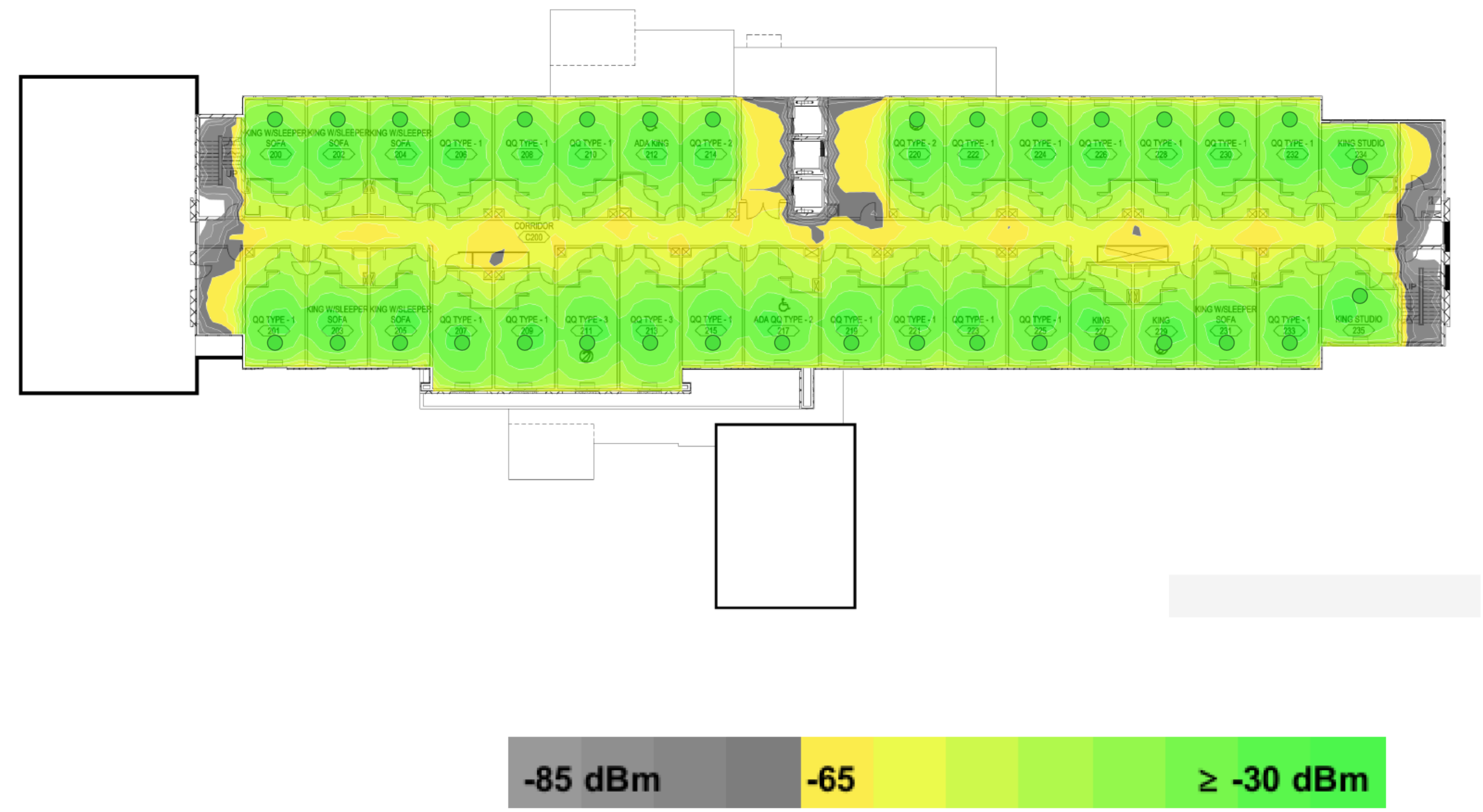
This scenario shows an access point placed inside every guest room with concrete walls.
Concrete limits how Wi-Fi signals travel between rooms. With an AP in each room, coverage remains strong and consistent within each space.
This setup delivers reliable performance and avoids coverage gaps.
Takeaway: Concrete construction often requires an AP in each room to maintain consistent coverage.
Example 2: One Room Without an AP (Concrete Walls)
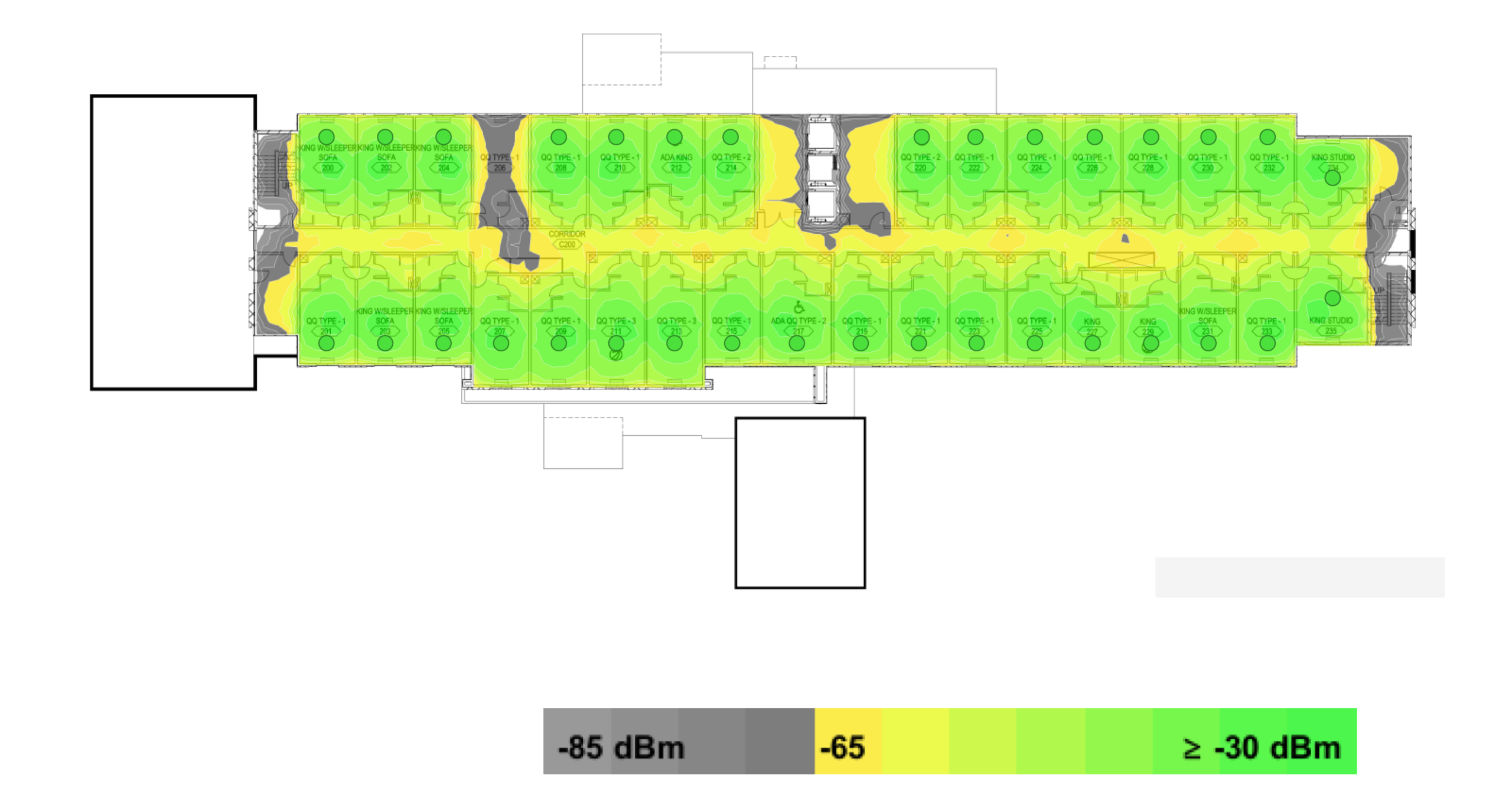
This heatmap shows the same concrete-wall layout, but with one room missing an access point.
The room without an AP becomes a clear dead spot. Concrete walls block the signal from adjacent rooms.
Takeaway: Removing even one AP in concrete environments can create immediate coverage gaps.
“Concrete limits how far the signal can travel,” Patel explains. “If you remove an AP, coverage drops off quickly in that space.”
Example 3: AP in Every Other Room (Drywall Construction)
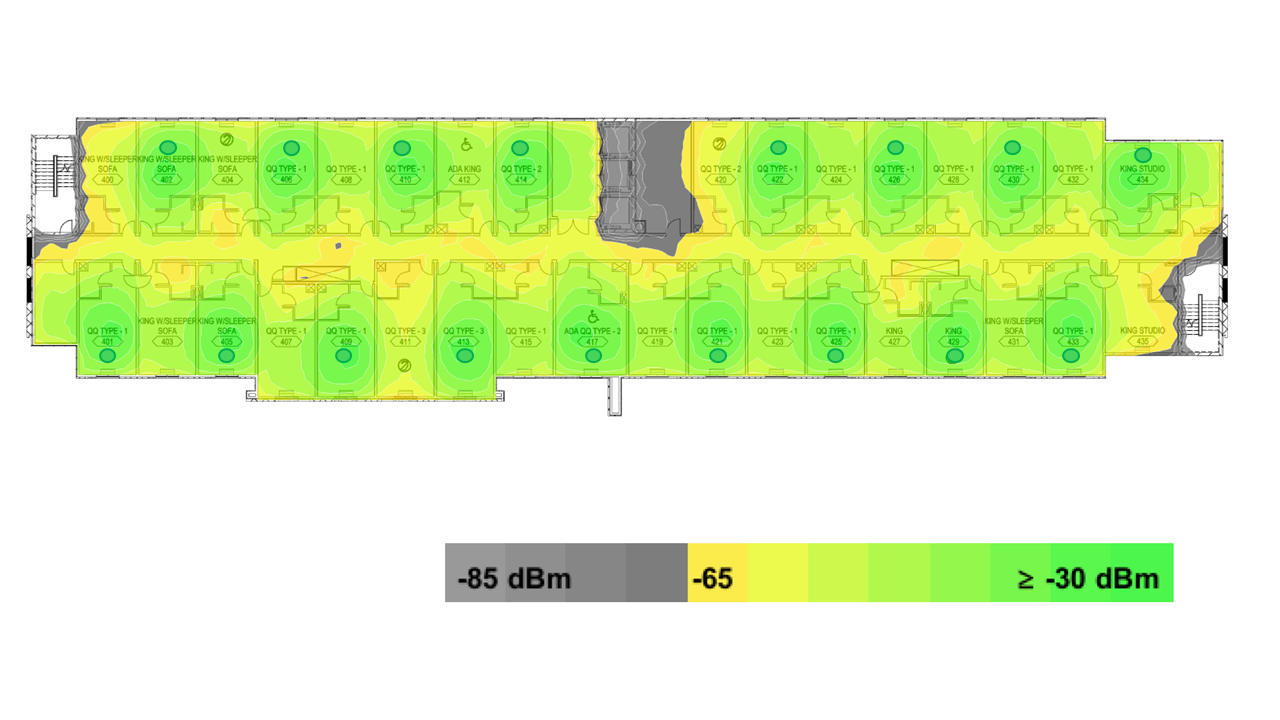
In this example, access points are installed in every other room with drywall construction.
Signals travel more easily through drywall. Coverage extends into adjacent rooms, though strength varies.
This setup can work in some layouts, but it may still create weaker areas.
Takeaway: Drywall allows the signal to travel, but shared APs can still lead to inconsistent performance.
Example 4: One Room Without an AP (Drywall Construction)
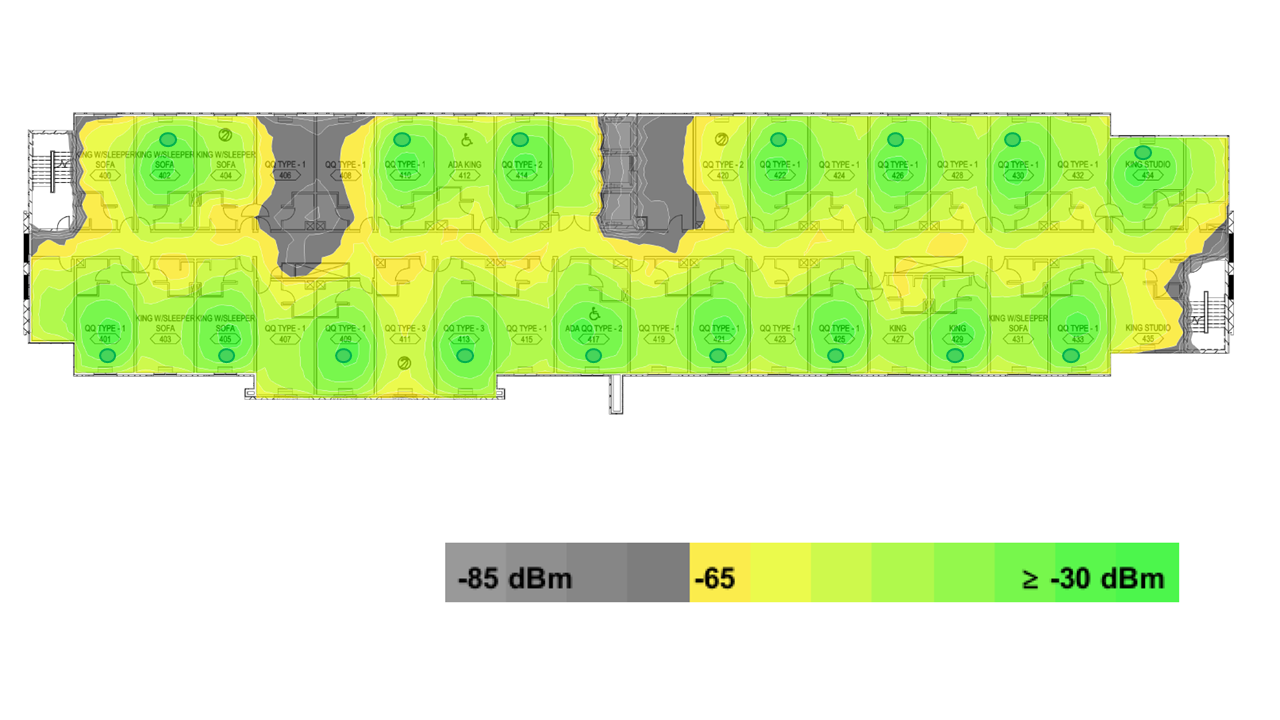
This scenario removes one AP from the drywall configuration.
Even with better signal travel, the room without an AP shows a noticeable drop in coverage. The signal also drops in part of an adjacent room.
Takeaway: Even in drywall construction, removing APs reduces reliability in affected rooms.
“Construction materials play a major role in Wi-Fi performance,” Patel says. “Drywall allows more signal movement, but placement still matters.”
Larger Room Scenarios (Upscale / Full-Service Property)
The following examples reflect a larger, upscale or full-service hospitality property with more spacious guest rooms and concrete construction. These properties often include suites or expanded layouts that require more careful Wi-Fi planning.
Example 5: AP in Each Room (Large Rooms, Concrete Walls)
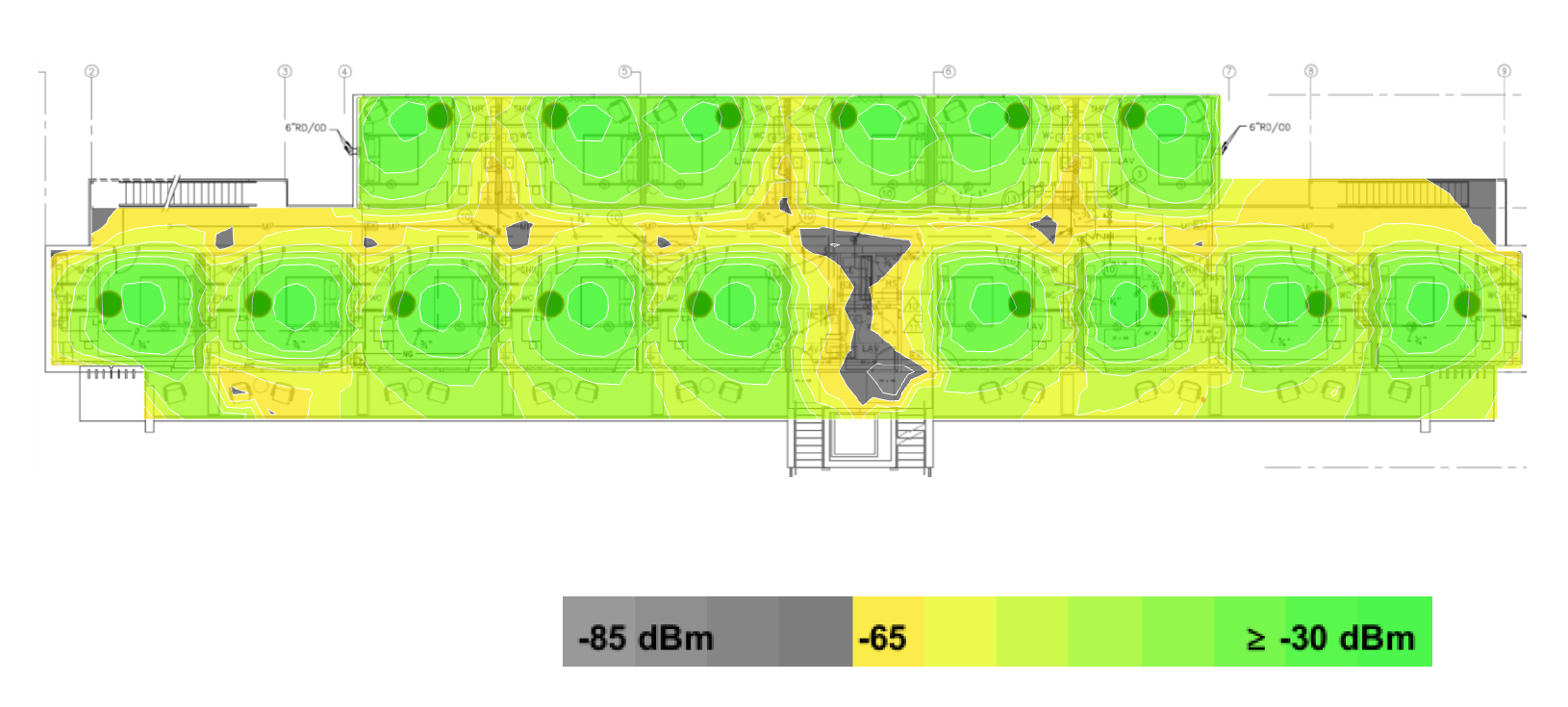
In this example, larger rooms use concrete construction with an AP in each room.
Coverage remains strong within each room, but the signal does not travel far beyond the walls.
This setup supports consistent performance despite larger spaces.
Takeaway: Larger rooms still benefit from dedicated APs, especially with dense construction.
Example 6: One Room Without an AP (Large Rooms, Concrete Walls)
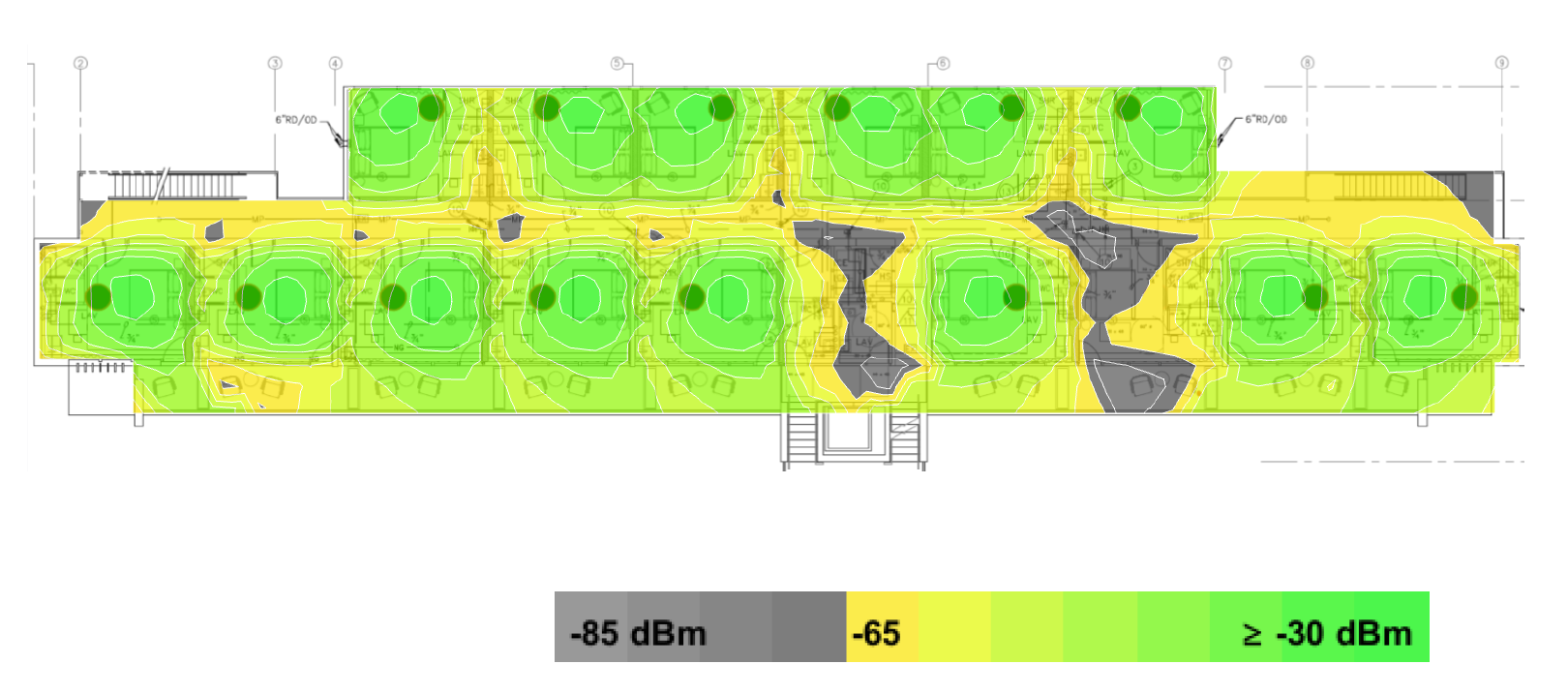
This heatmap removes one AP from the larger room configuration.
The affected room shows a clear dead spot. Concrete walls prevent nearby APs from filling the gap.
Removing even one AP can significantly reduce coverage in larger spaces.
Takeaway: Coverage gaps increase quickly in larger rooms when AP density drops.
Example 7: AP in Every Other Room (Large Rooms, Concrete Walls)
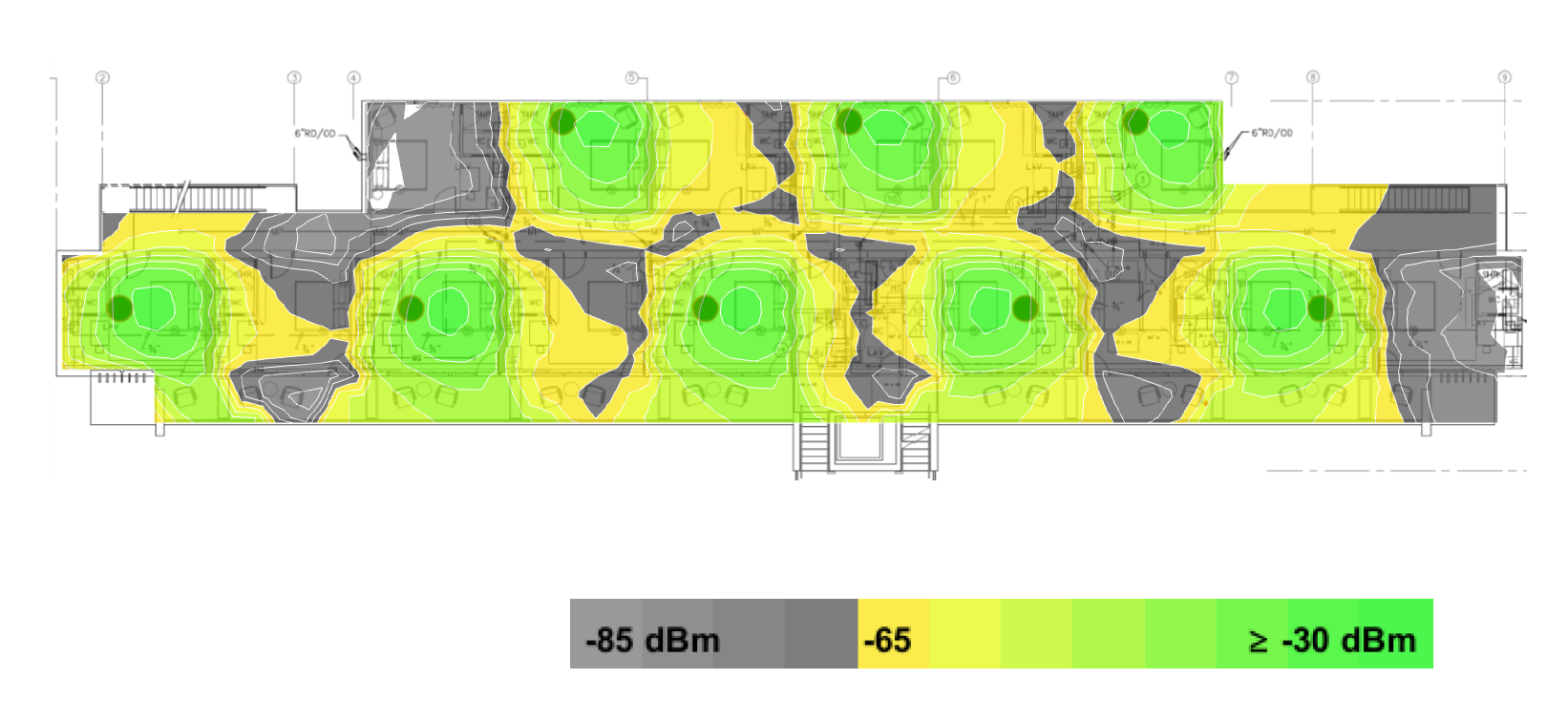
This scenario places APs in every other room in a large room, concrete-wall layout.
Coverage extends unevenly into adjacent rooms. Some areas show weak signals or inconsistent performance.
This approach may reduce hardware costs, but it can affect the guest experience.
Takeaway: Lower AP density can introduce inconsistent coverage, even if some signal reaches adjacent rooms.
Example 8: Reduced AP Coverage (Large Rooms, Concrete Walls)
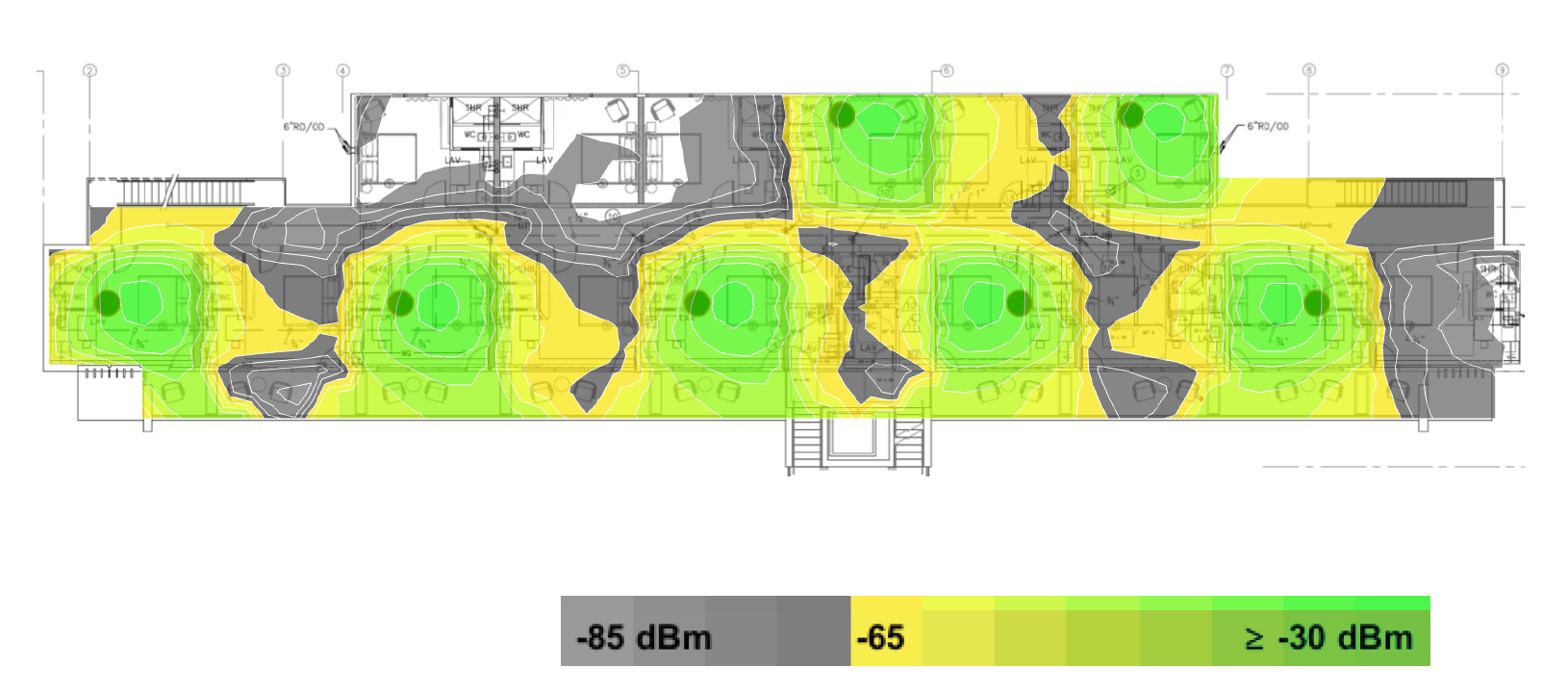
This final example removes an AP from the every-other-room configuration.
Coverage gaps become more pronounced. Several areas show weak or inconsistent signals. One whole section of this floor shows no signal at all.
These results highlight the risk of reducing AP density in larger rooms with concrete construction.
Takeaway: Cost-saving decisions on AP count can lead to widespread performance issues in larger properties.
What These Examples Mean for Hospitality Properties
These heatmaps highlight a key point: Wi-Fi performance depends on design decisions made early in the process.
Room layout, construction materials, and cabling availability all influence the outcome. There is no one-size-fits-all solution.
Working with an experienced technology partner like WorldVue helps ensure these factors are evaluated before installation begins. With five decades of experience, we can help you avoid stumbling blocks that waste time and money.
For additional guidance, properties can reference industry resources such as our AAHOA technology toolkit. You can also explore our guide to technology planning for new construction hotels.
Key Lessons from These Heatmaps
These examples highlight several important principles for hospitality Wi-Fi design:
- Concrete walls limit signal travel and often require an access point in each room.
- Removing access points creates immediate dead spots, even in smaller rooms.
- Drywall allows better signal movement, but shared APs still reduce consistency.
- Larger rooms increase the risk of weak coverage when AP density drops.
These factors directly impact guest satisfaction, especially as streaming and connected devices continue to increase.
“Guests are connecting more mobile devices than ever,” Patel says. “It’s not uncommon for a family to bring 10 devices into their guest room. That puts more demand on the Wi-Fi network and makes consistent coverage more important.”
Bringing It Back to Infrastructure Planning
These real-world examples reinforce the recommendations outlined in our earlier articles. They also demonstrate why access point placement, cabling design, and early planning matter.
Strong infrastructure planning supports better Wi-Fi performance and a more consistent and enjoyable guest experience.
Explore Hospitality Wi-Fi Solutions from WorldVue
Wi-Fi performance starts with the right design decisions. Learn how WorldVue helps hospitality properties plan and deploy wireless networks that support guest-facing technology.